Start with the run you are actually playing
Grand Theft Auto VI launched on November 19, 2026 for PlayStation 5 and Xbox Series X|S. This tracker is a companion for that story mode: open it beside the game, select a category and leave yourself a record of what you have already done. There is no account to create, and neither tool reads your console save. The percentage at the top counts entries checked in this notebook; it is not a reading of the game's own 100% counter.
If you are just getting started, mark the prologue after it is finished and leave the later entries alone. If you are midway through the campaign, use the chapter selector and work backwards from the progress you can confirm. The launch guide uses 91 main missions across five chapters, including the prologue in Chapter 1. The roughly 60–80-hour story estimate describes a range of play styles, not a target to chase. Time spent exploring or revisiting a scene changes that pace.
Pick a tab for the job at hand
- Campaign keeps the five main-story groups apart. The numbered slots are there to count, not to reveal mission titles. The Story chapters guide explains where the first and last slot in each chapter falls.
- Cheats includes eight documented inputs and 53 community challenge slots. Use the separate Cheat codes workbench to see the directions for a specific controller. A check means an unlock was recorded here, not that the site activated it. Start with a clean save if you intend to test a code.
- Trophies has 55 milestones, including a dedicated PlayStation Platinum slot. Use the console's trophy or achievement screen for official names, unlock dates and the order in which yours registered.
- Regions & safes separates six exploration marks from the three Port Gellhorn safes, so a trip to the boatyard does not accidentally stand in for an opened safe.
- Ending readiness is a five-item reminder, not a prediction. The Endings guide explains which relationship, savings and choice details to review without revealing the outcome.
When you want the map, not the story
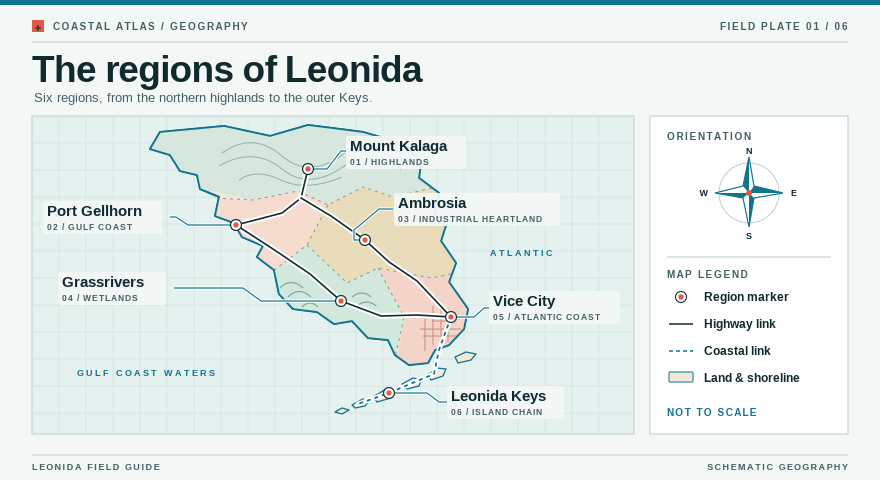
The atlas groups Vice City, Port Gellhorn, Grassrivers, Mount Kalaga, Ambrosia and the Leonida Keys. Its drawings help you recognise names, not plot a turn-by-turn route. If you came to identify someone rather than finish a mission, go directly to Characters. If you are waiting to play on a computer, use PC status: its comparison is an estimate and not a reason to buy hardware before official requirements arrive. The locale switch changes the language of the page without changing your local checklist.

Keep a record you can actually use
Before changing anything in the checklist, look at the corresponding screen in the game. On a returning save, the most valuable information is what has already registered, not what you remember attempting. Mark a box only after you can point to that result. If you are juggling two playthroughs, keep a separate, clearly named export for each one; the live checklist contains one set of marks.
The browser does not know whether you are on your own console, playing a friend's copy or replaying a chapter. It will not automatically undo a mark after you load an older save. Export a JSON copy before you clear site data or switch devices. Imports replace the current marks, so export the current run first if you might want it back. Keep actual game saves separately: the tiny checklist file contains no console save and cannot recover one.
What to trust when a guide and the game disagree
Start with the menu on the version you are playing. A screenshot of a different build can help locate a screen, but it cannot tell you whether the same item is available on your save. When reporting a difference, note the platform, the version visible in the game and what your screen actually showed. You do not need to post a profile name, save file or plot outcome.
The official launch page establishes the console release. The launch-guide counts, sequences and story notes on this site are a separate category. An example or estimate is labelled as such; we do not promote an empty checklist slot to a fact. Artwork in the atlas is illustrative. It is a visual reference for the guide, not a screenshot, a route tested in the game or a source for additional clues.
Leave yourself a useful stopping point
At the start of a session, choose one concrete goal and pick a stopping point you can recognise later: a finished mission, an opened safe or a status screen you can return to. Checking something off as soon as you confirm it is easier than reconstructing a whole evening from memory. If the game presents a choice you may want to revisit, use another save slot rather than assuming that going back to the checklist will undo it.
Between chapters, take a moment to compare the campaign log with the other categories. A tidy notebook has room for things you intentionally skipped. Keep a side activity pending if you want to come back with the relevant section open; do not let it interrupt a scene just because it appears on a list. This is a planning routine, not a list of additional requirements for the game.