GTA 6 is out on consoles; PC is not dated
The official release was November 19, 2026 for PS5 and Xbox Series X|S. Rockstar had not announced an official PC date or specs as of November 25. A first-quarter 2027 PC window is an outlook, not a preorder deadline; the 2027 outlook for the new game's online component is separate and likewise unconfirmed here. Do not confuse it with the already operating GTA Online service.
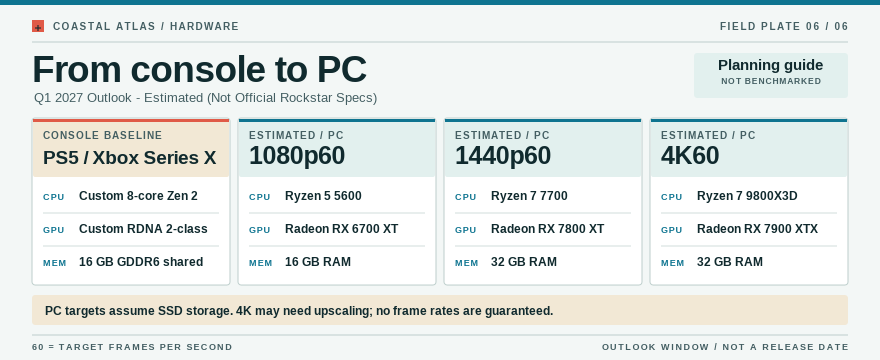
Estimated tier comparison — not minimums or benchmarks
| Example target | Processor | Graphics | System memory |
|---|---|---|---|
| 1080p, 60 fps target | Ryzen 5 5600 | Radeon RX 6700 XT | 16 GB |
| 1440p, 60 fps target | Ryzen 7 7700 | Radeon RX 7800 XT | 32 GB |
| 4K, 60 fps target | Ryzen 7 9800X3D | Radeon RX 7900 XTX | 32 GB |
These are comparison points, not promised settings or frame rates. They assume an SSD and leave out workload variables such as traffic density, ray tracing and upscaling. At 4K, the choice of upscaling or settings can change the workload substantially. Even two systems using the same graphics chip can behave differently when power or cooling limits differ.
What a console comparison can and cannot tell you
PS5 and Xbox Series X provide a reference class: a custom eight-core Zen 2 CPU, custom RDNA 2-class graphics and 16 GB of shared GDDR6 memory. The Series S is a different configuration. PC system RAM is not graphics memory; do not add them up and declare that a machine equals a console. Rockstar's installation note quotes up to 212 GB for console installations depending on the device. That is not an official PC storage figure.
If you want a useful comparison later, write down your current processor and graphics model, system RAM, graphics memory, free SSD space and monitor resolution. Keep the target separate from the result: a PC that matches one example has not passed a compatibility check. Wait for Rockstar's requirements and tests of the shipping PC build before treating any tier as a buying guide.

What to trust when a guide and the game disagree
Start with the menu on the version you are playing. A screenshot of a different build can help locate a screen, but it cannot tell you whether the same item is available on your save. When reporting a difference, note the platform, the version visible in the game and what your screen actually showed. You do not need to post a profile name, save file or plot outcome.
The official launch page establishes the console release. The launch-guide counts, sequences and story notes on this site are a separate category. An example or estimate is labelled as such; we do not promote an empty checklist slot to a fact. Artwork in the atlas is illustrative. It is a visual reference for the guide, not a screenshot, a route tested in the game or a source for additional clues.
Keep a record you can actually use
Before changing anything in the checklist, look at the corresponding screen in the game. On a returning save, the most valuable information is what has already registered, not what you remember attempting. Mark a box only after you can point to that result. If you are juggling two playthroughs, keep a separate, clearly named export for each one; the live checklist contains one set of marks.
The browser does not know whether you are on your own console, playing a friend's copy or replaying a chapter. It will not automatically undo a mark after you load an older save. Export a JSON copy before you clear site data or switch devices. Imports replace the current marks, so export the current run first if you might want it back. Keep actual game saves separately: the tiny checklist file contains no console save and cannot recover one.
Continue reading: Completion tracker · About